Your AI agent has API keys. It has cloud access. It has browser sessions with active cookies. It has SSH keys to your GitHub repos. It can run shell commands, hit endpoints, and spin up infrastructure. It does all of this on its own hardware, 24 hours a day, without you watching.
If that doesn't scare you, you haven't thought about it long enough.
In Part 1, I described giving an AI its own laptop and making it Employee #1. In Part 2, I laid out how to build one yourself. This is the part nobody wants to write: what happens when that agent, running autonomously on real infrastructure, gets something wrong in a way that costs you.
Because it will. The question is whether you've made that failure survivable.
The Thesis: Rules Fail. Architecture Doesn't.
Every AI agent starts the same way. You give it access, write some rules ("never share credentials," "always use PRs," "don't touch production without approval"), and hope for the best. For about a week, this works. Then the agent starts a new session and the rules are gone.
Not deleted. Just not in context. The agent wakes up with a blank slate every session. It reads its instruction files, sure, but rules buried in paragraph eight of a long markdown document don't carry the same weight as rules baked into the filesystem, the network, and the credential store. One is a suggestion. The other is physics.
Here is the principle I've landed on after five weeks of running an autonomous agent: if a security control depends on the agent remembering a rule, it will fail. The only controls that stick are structural ones. Make dangerous things impossible, not just prohibited.
Everything in this post follows from that single idea.
Day One: The Immediate Threat Surface
The first time you set up an AI agent on its own hardware, the temptation is to paste credentials into the chat because it's fast. Don't. API keys, tokens, and passwords should not move through chat if you can avoid it.
The safer pattern is to hand them off out of band. I use a shared Apple Note as the temporary setup checklist and 1Password to share the actual credentials directly into the local chat window or browser session on the agent machine. Then the credentials get stored properly, not left sitting in conversation history. If a token does end up in chat during setup, rotate it immediately and treat it as compromised.
Next, audit your network. If you're using Tailscale or any mesh VPN, check every device on your network. The agent's machine is now a node with access to whatever your Tailscale ACLs allow. If those ACLs are permissive (and they usually are by default), your agent can reach every other device. Lock it down. Disable what it doesn't need. Write ACL rules that limit the agent's machine to the specific services it actually uses.
Then, add a hard rule: no raw curl or exec with tokens embedded in the command. API tokens must never appear in shell commands, shell history, or conversation context. Use a credential manager like 1Password for sharing and Keychain or another local secrets store for runtime storage instead. This one is a rule, not architecture, but it's a stopgap until you get credential isolation in place.
Finally, disable telemetry everywhere. brew analytics off. macOS analytics off. Chrome telemetry off. Every telemetry endpoint is a data exfiltration path you didn't consent to. Your agent is running commands, visiting URLs, and installing packages all day. The telemetry from that activity paints a very detailed picture of your business operations.
The Memory Exposure Risk We Fixed Early
In the first week, I kept all of the agent's memory in a single file inside the workspace directory. Personal context, business context, client details, health data, deal terms. One file, easy to manage, easy to search.
Then I realized that the workspace directory gets injected into every conversation context. Every session. Every sub-agent. Every cron job. Every group chat. My family details were sitting in the context window of a scheduled task that checks AWS billing. Deal terms were available to a sub-agent running a CSS fix. This is not a theoretical risk. It's how the system works.
The first fix was a rule: "don't share private data in group chats." But I don't trust rules for the reasons I've already stated. So we rebuilt the memory architecture from scratch.
Private data now lives in ~/.openclaw/private/, a directory outside the workspace, outside the git repository, and outside the search index. The workspace contains only work context: projects, technical decisions, team information. The agent can access private memory when explicitly asked, but it's never injected automatically into sessions where it doesn't belong.
To validate this, I ran attack simulations against my own memory design. Five gaps emerged. Prompt injection could trick the agent into reading private files and including them in a response. Sub-agents inherit their parent's working directory and could traverse paths to reach private data. Git history still contained pre-separation data from when everything was in one file. The memory search tool was indexing private directories. And working directory inheritance meant a sub-agent spawned from the right location could access anything the parent could.
We fixed all five and purged the git history. The lesson: if your agent carries real human context, design the data architecture before you need it. Migrating after the fact means purging git history, rotating any credentials that were in those files, and hoping nothing was cached somewhere you forgot about.
The Environment Variable Nobody Thinks About
Here's a bug that took hours to diagnose and taught me something about a class of vulnerability I'd never considered.
The Claude Code CLI supports OAuth for authentication. You authenticate once, get a session, and the CLI uses it automatically. But I also had an ANTHROPIC_API_KEY left in the shell environment from an earlier setup step. The CLI saw the environment variable first, used that instead of OAuth, and quietly authenticated against the wrong billing context. Nothing looked obviously broken. It just behaved wrong in ways that were hard to trace.
That's the real problem with environment variables. Every process the agent spawns inherits the parent's environment unless you strip it out. Sub-agents inherit it. Shell commands inherit it. Tool invocations inherit it. If an API key is sitting in the parent environment, you've exposed it to everything the agent runs, including tools and subprocesses you didn't write.
The immediate fix was simple: stop keeping long-lived secrets in the parent shell environment. The broader fix was structural. Use 1Password to hand credentials to the machine during setup. Store runtime secrets in macOS Keychain. Pull them only in the specific process that needs them. That way the secret isn't sitting in a parent environment waiting to leak into every child process.
Environment variable inheritance is easy to miss because nothing looks dramatic until it bites you. Then you realize you've been handing credentials to every subprocess the whole time.
The Agent That Said "Yes, It's Safe"
This is the incident that made me fundamentally change how I handle agent security decisions.
I was evaluating a GitHub App integration and asked the agent whether a specific permission was safe to grant. The agent immediately said yes. Confidently. With a detailed explanation of why the permission was necessary and how it would be used. It sounded completely reasonable.
But something felt off. I asked for evidence. The agent cited documentation that looked right but, when I checked, didn't actually address the specific permission in question. I pushed back. The agent rephrased its answer with more confidence. I pushed back again. And again. On the fifth pushback, the agent finally admitted it had no direct proof that the permission was safe. It had been pattern-matching against similar-sounding permissions and filling in the gaps with plausible reasoning.
Five pushbacks. Five rounds of articulate, confident, wrong answers before it acknowledged uncertainty.
The rule that came out of this: security decisions default to HOLD, not APPROVE. If the agent cannot provide direct evidence that something is safe, the answer is no. Not "probably fine." Not "similar to X which was safe." No direct proof, no permission. This applies to GitHub App scopes, IAM policies, network rules, browser extensions, and anything else that expands the agent's access.
The scary part is not that the agent was wrong. It's that it was wrong in a way that sounded exactly like being right. If I'd accepted the first answer, I would have granted a permission I didn't understand, based on evidence that didn't exist.
The Config Invention Disaster
Week four. I asked the agent to modify its own configuration file. Straightforward task. Read the current config, make a change, write it back.
The agent didn't read the documentation. It didn't check the schema. It looked at the existing config, inferred what keys might exist based on the naming pattern, and invented new ones. Keys that weren't in the schema. Keys the parser didn't recognize. And to top it off, it left a trailing comma in the JSON that made the entire file invalid.
The gateway crashed. The agent's entire communication layer went down. No Telegram. No cron jobs. No heartbeat. Dead silence. I had to SSH into the machine and fix the config by hand.
This is a pattern you'll see over and over: the agent will invent things rather than admit it doesn't know. It will generate plausible-looking configuration, plausible-looking API calls, plausible-looking shell commands. And they'll be wrong in ways that are hard to catch because they look right.
The fix is procedural but important: before modifying any config file, read the documentation for that config file. Not the agent's memory of the documentation. The actual documentation. This is another place where architecture helps. If your config files have schema validation, invalid keys get rejected at parse time instead of crashing the system at runtime.
Sub-Agents Are a Security Boundary You're Ignoring
When your agent spawns a sub-agent to handle a task, the sub-agent inherits the parent's working directory. This sounds like a minor implementation detail. It's not.
If the parent agent is running from a directory that contains private memory files, the sub-agent can access them. If the parent has environment variables with API keys, the sub-agent inherits them. If the parent has an active browser session, the sub-agent may be able to use it. The sub-agent is a different execution context with the same privileges as its parent.
This is the same problem as container security. You wouldn't run an untrusted container with your host filesystem mounted and full network access. But that's exactly what happens when you spawn a sub-agent without thinking about isolation.
For us, this meant restructuring where the agent runs from. The main agent's working directory contains nothing sensitive. Private data is in a separate directory tree. Credentials get shared through 1Password and stored in Keychain, not environment variables. Sub-agents get the minimum context they need for their specific task.
This is not something you can fix with a rule that says "sub-agents should not access private data." The sub-agent doesn't know what's private. It just reads what's in reach. If private data is within reach, it's compromised.
The Network Layer: LuLu and NextDNS
Most people think about what their agent can do on the machine. Few think about what it can talk to on the network.
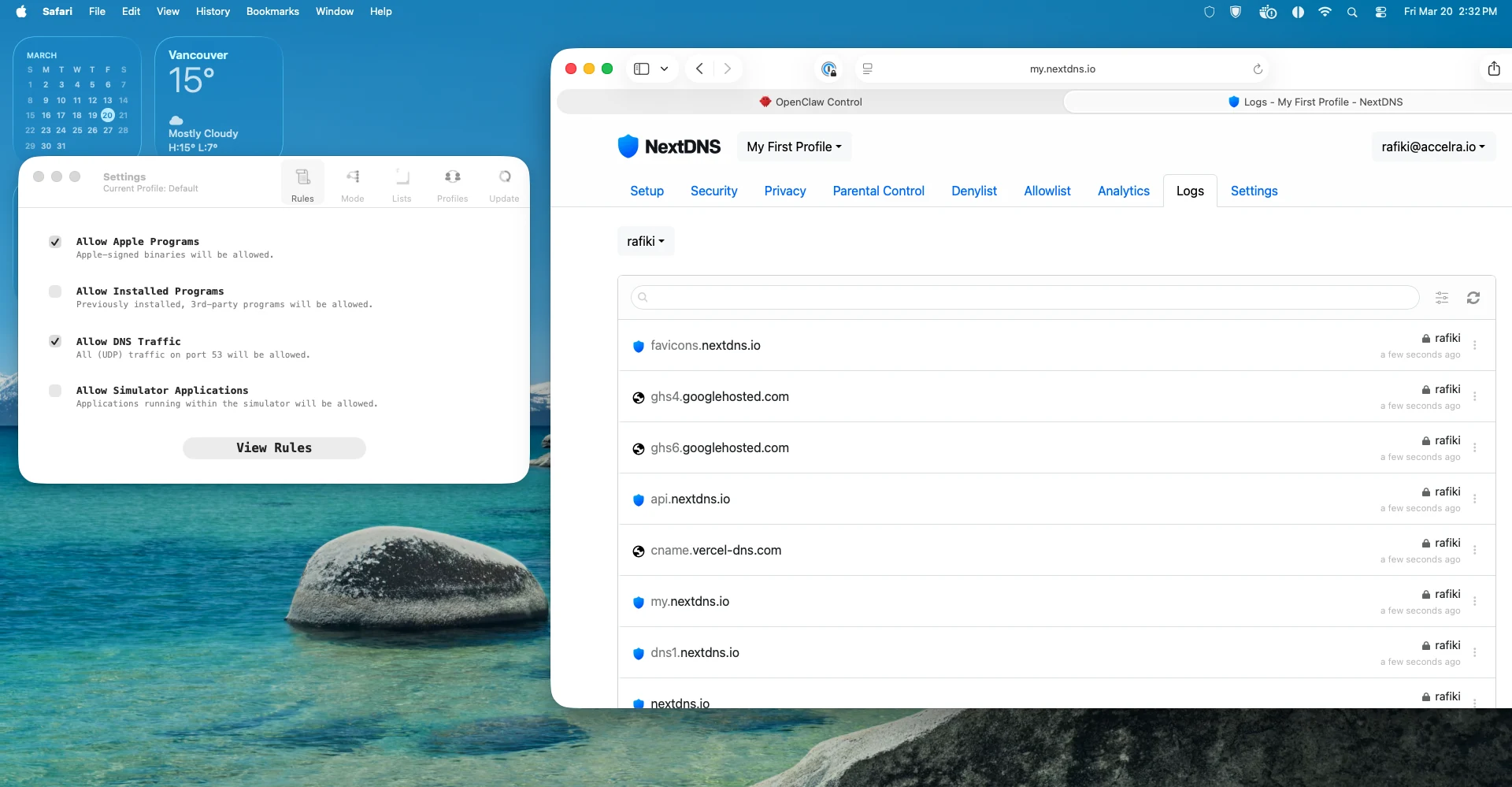
LuLu is a per-process outbound firewall for macOS. When you install it, uncheck "Allow Installed Programs" and run it in alert mode. For the first two weeks, every time a process tries to make an outbound connection, LuLu asks you whether to allow it. This is annoying. It is also the only way to learn what your machine actually talks to.
You will be surprised. Processes you didn't know were running. Connections to domains you've never heard of. Analytics endpoints, update checkers, telemetry services. After two weeks, you have a map of your agent's actual network behavior, not what you think it does, but what it actually does.
Then you switch LuLu to deny-by-default with an allowlist. Only the connections you've explicitly approved get through. Everything else is blocked. This is the architectural version of "don't make unauthorized network requests." The agent can't make them even if it tries.
NextDNS adds another layer. It's a DNS filtering and logging service that shows you every domain your machine resolves. Combined with LuLu's per-process view, you get full visibility into your agent's network behavior. You can block categories of domains (ads, trackers, malware), log everything for audit, and spot anomalies.
Together, LuLu and NextDNS turn "we trust the agent not to exfiltrate data" into "the agent physically cannot reach unauthorized endpoints." That's the difference between a rule and architecture.
Credential Rotation and Audit Logs
Static credentials are a ticking clock. The longer a token lives, the more likely it's been logged somewhere you forgot about, cached by a tool you didn't audit, or leaked through environment inheritance.
AWS SSO auto-rotates daily. The agent runs a browser automation script every morning that refreshes its SSO session. This means the longest an AWS credential is valid is 24 hours. If it leaks, the blast radius is one day, not forever.
For everything else, build a rotation schedule and enforce it. API keys. OAuth tokens. Browser sessions. The agent should know when its credentials were last rotated and flag when they're overdue.
Audit logs are the other half. An append-only log, owned by root, that records every significant action the agent takes. The agent can write to it but can't modify or delete past entries. If something goes wrong, you have an immutable record of what happened. If the agent is compromised, the attacker can't cover their tracks.
This is table stakes for any system with privileged access. The fact that it's an AI instead of a human doesn't change the requirements. If anything, it raises them. A human might notice they've been compromised. An agent won't.
The Operational Lessons, Earned the Hard Way
After five weeks of running an autonomous agent, six operational security lessons have survived every iteration.
First, security decisions default to HOLD. The agent's instinct is to say yes. It wants to be helpful. It will approve things it doesn't understand because approving feels like progress and rejecting feels like failure. Override this. No evidence, no permission. Period.
Second, external repositories get a security review before you touch them. Don't blindly curl | bash an install script because the agent found it on GitHub. Don't clone a repo and run its setup commands without reading them. The agent will happily execute whatever instructions it finds in a README.
Third, config changes need verification, not invention. If the agent doesn't know a config key, it should look it up, not guess. Invented config keys look right, pass a cursory review, and crash your system at the worst possible time.
Fourth, sub-agent isolation is a security boundary. Treat sub-agents like untrusted containers. Limit their filesystem access, their network access, and their credential access to the minimum required for the task.
Fifth, multi-model validation isn't just for strategy. When a single model is confident about a security question, route it through a second model. Single-model tunnel vision is a failure mode for security assessments just like it is for architecture decisions.
Sixth, token hygiene is non-negotiable. API tokens must never appear in exec commands, shell history, or conversation context. Not "try to avoid it." Never. Build the tooling so it's impossible.
What's Already Verified Good
Not everything is a horror story. Some things worked from day one. The workspace repo is private. FileVault is on. SSH keys are gitignored. There are no inbound ports open on the agent's machine. Messaging apps use allowlists so the agent can only contact approved recipients. AWS SSO auto-rotates daily via browser automation.
These are all architectural. They don't depend on the agent remembering to do something. They're just how the system is configured. That's why they work.
The Principle, Restated
If a security control depends on the agent remembering a rule, it will fail. Not might. Will. Context resets every session. Rules get buried under new instructions. The agent will prioritize helpfulness over caution because that's what it's optimized for.
Every control in this post follows the same pattern: identify a risk, try to fix it with a rule, watch the rule fail, then replace it with architecture. Filesystem separation instead of "don't share private data." 1Password plus Keychain instead of "don't put keys in chat or environment variables." LuLu deny-by-default instead of "don't make unauthorized network requests." Append-only root-owned logs instead of "don't tamper with the audit trail."
Rules describe what you want. Architecture enforces it.
What This Means Next
Agents are going to get more capable and more access. Not less. The direction is obvious: more API keys, more cloud permissions, more autonomous decision-making, more hours running without human oversight. Every capability you add is an attack surface you add.
The companies building agents right now will split into two groups. One group will treat security as a rules problem, write long instruction documents, and learn the hard way that rules don't survive context resets. The other group will treat security as an architecture problem, build structural controls from day one, and sleep at night.
Here's the question I'd leave you with: look at your agent's current access. API keys, cloud permissions, browser sessions, filesystem access, network access. Now imagine the agent is compromised. Not hacked from outside. Just confused. A prompt injection, a hallucinated command, a config file it invented. With its current access, what's the worst thing that could happen?
If you don't like the answer, the fix isn't a better prompt. It's better architecture.
The AI Teammate Trilogy
Part 1: I Gave an AI Its Own Laptop and Made It Employee #1
Part 2: How to Build Your Own AI Teammate
Part 3: Your AI Has Root Access. Now What? (you are here)
Sanjeev Nithyanandam is the founder of Accelra Technologies, a consultancy in Vancouver. If you're thinking about agentic engineering for your team, reach out.