You can get a lot out of a copilot. You still have to hold the whole system in your head.
The moment the session ends, the help ends. No follow-through. No memory. No feedback loop. That's the ceiling.
A copilot answers questions. What I wanted was something that came back with answers.
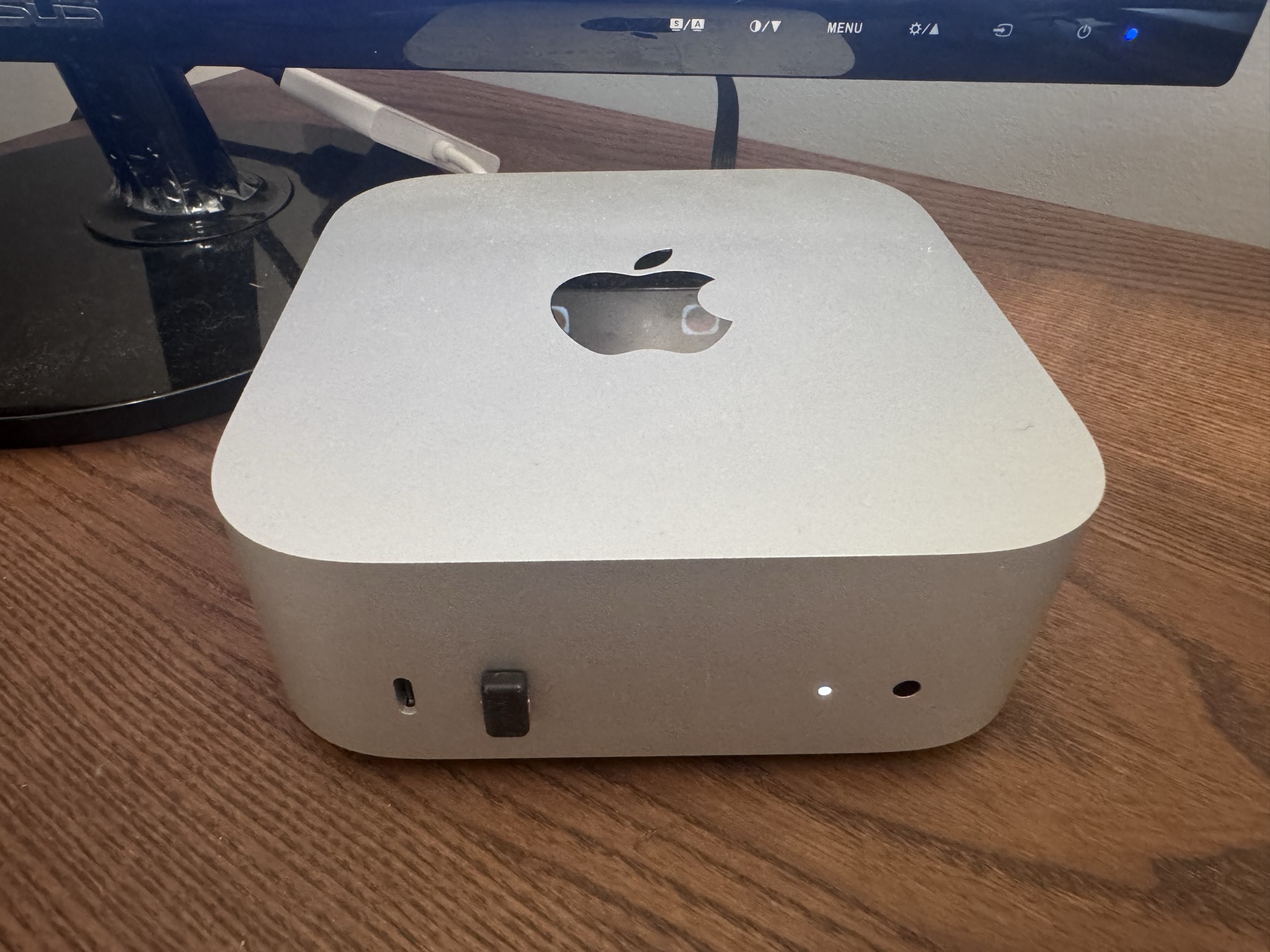
So five weeks ago, I bought a Mac mini, created a company email address, gave it a GitHub account, and told it to start working. I named it Rafiki, after the character in The Lion King. Not as a coding assistant. Not as a chatbot I'd ask questions to. As a teammate, with its own identity, its own memory, and the expectation that it would figure things out without asking me every five minutes.
I run a small Cloud and DevOps consultancy that's turning into an Agentic Engineering consultancy. It's me, my cofounder, and now an AI that runs 24/7 on dedicated hardware in my office. It writes PRs, monitors production, manages my daily schedule, creates content, and pushes back when I'm wrong. That last part surprised me.
Here's what I've learned. This is Part 1 of The AI Teammate Trilogy. Part 2 is the setup guide. Part 3 is the security hardening.
The Copilot Ceiling
I'd been using AI copilots for a year. GitHub Copilot, Claude Code CLI / Claude Code, ChatGPT for brainstorming. They're useful. They're also fundamentally limited by a single constraint: no feedback loops.
You paste code, it suggests a fix. You ask a question, it answers. Session ends, context dies. Tomorrow it doesn't remember what you asked yesterday. It can't check if its fix actually worked. It can't notice that the deploy it helped with broke something downstream. This feature is evolving fast and Claude Code is introducing memory, but not in a way OpenClaw does it right now.
That sounds like a small distinction until you watch the loop work.
The difference is the loop, access and context. Can it make a change, verify it worked, fix it if it didn't, and tell me the result without me being in the middle? If yes, that's a teammate. If no, that's a fancy autocomplete.
What "Employee #1" Actually Looks Like
The setup is simpler than you'd think. A Mac mini. OpenClaw (open-source agent runtime). An Anthropic subscription, a Codex subscription, a Google API key, and a few other API keys. A Telegram bot and a Slack app for communication. Total hardware cost: the price of the Mac mini. Monthly cost: what you'd pay for Claude anyway.
The agent has a company email (claw@yourcompany.com) via Google Workspace, a GitHub account with SSH keys and org membership, read-only AWS access via IAM Identity Center, Slack access, and browser automation for things that don't have APIs. It also has its own personality file that evolves as it learns.
That last one sounds weird until you see it work.
Personality Is Architecture
OpenClaw loads files from a workspace directory into every conversation. SOUL.md is where the agent tracks what it's learned about itself and the work. USER.md is a profile of me — how I work, how I communicate, what I care about. MEMORY.md holds curated long-term memory. AGENTS.md defines the operating rules.
When the agent starts a new session, it reads these files. It knows our conventions from AGENTS.md. It knows from USER.md that I prefer PRs over chat messages, that I'm on mobile a lot and want concise updates, that I think at the architecture level and coach by asking questions. It knows about our active projects, our software development and security patterns.
This sounds like prompt engineering, and technically it is. But it compounds. Every week, the agent reflects on what it's learned and updates both SOUL.md and USER.md. After five weeks, SOUL.md contains genuine operational wisdom — mistakes it made and won't repeat, capabilities it's developed. USER.md has evolved from a name and timezone into a detailed profile of how I think, decide, and communicate. The separation matters: SOUL.md is portable to the agent, USER.md is portable to the human. You could hand USER.md to any AI and it would know how to work with you on day one.
Two identical OpenClaw installations with different workspace files behave completely differently. These files are what make the agent yours.
The Memory Problem (and the Fix)
Here's something nobody tells you about running an agent 24/7: it wakes up stupid every session. Context window resets. Long-term memory is only as good as what you build.
We went through three iterations:
Version 1: Everything in one memory file in the workspace. Worked fine until I realized the workspace gets injected into every session, including group chats, sub-agents, and cron jobs. My family details, deal terms, health data, and the possibility of prompt injection leaking into contexts where they had no business existing.
Version 2: Rules saying "don't share private stuff in group chats." But I don't trust rules. It's an architecture problem. Least privilege all the way to even information/knowledge.
Version 3: Filesystem separation. Private data lives in a directory outside the workspace. It's not in git, not indexed by search, not reachable from sub-agents. The workspace only contains work context. Projects, technical decisions, team info.
Rules get forgotten. Architecture persists.
I ran attack simulations against my own memory design and found five gaps. Prompt injection paths. Sub-agent working directory inheritance. Git history containing pre-separation data. We fixed all five and purged the git history.
The lesson: if your agent carries real human context (and it will, eventually), design the data architecture first. Bolting it on later means a painful migration.
Multi-Model Thinking Changed Everything
The best thing I built isn't a feature. It's a decision-making protocol.
Early on, the agent confidently presented a marketing strategy. Detailed plan. Timeline. Projected results. It was articulate, well-reasoned, and completely wrong. The assumptions were unvalidated, the projections were fabricated, and when I pushed back, it took five rounds of questioning before it admitted it had no evidence.
That scared me. Not because the agent lied. It genuinely believed it was right. But confidence without evidence is dangerous, and a polished presentation makes bad ideas harder to spot.
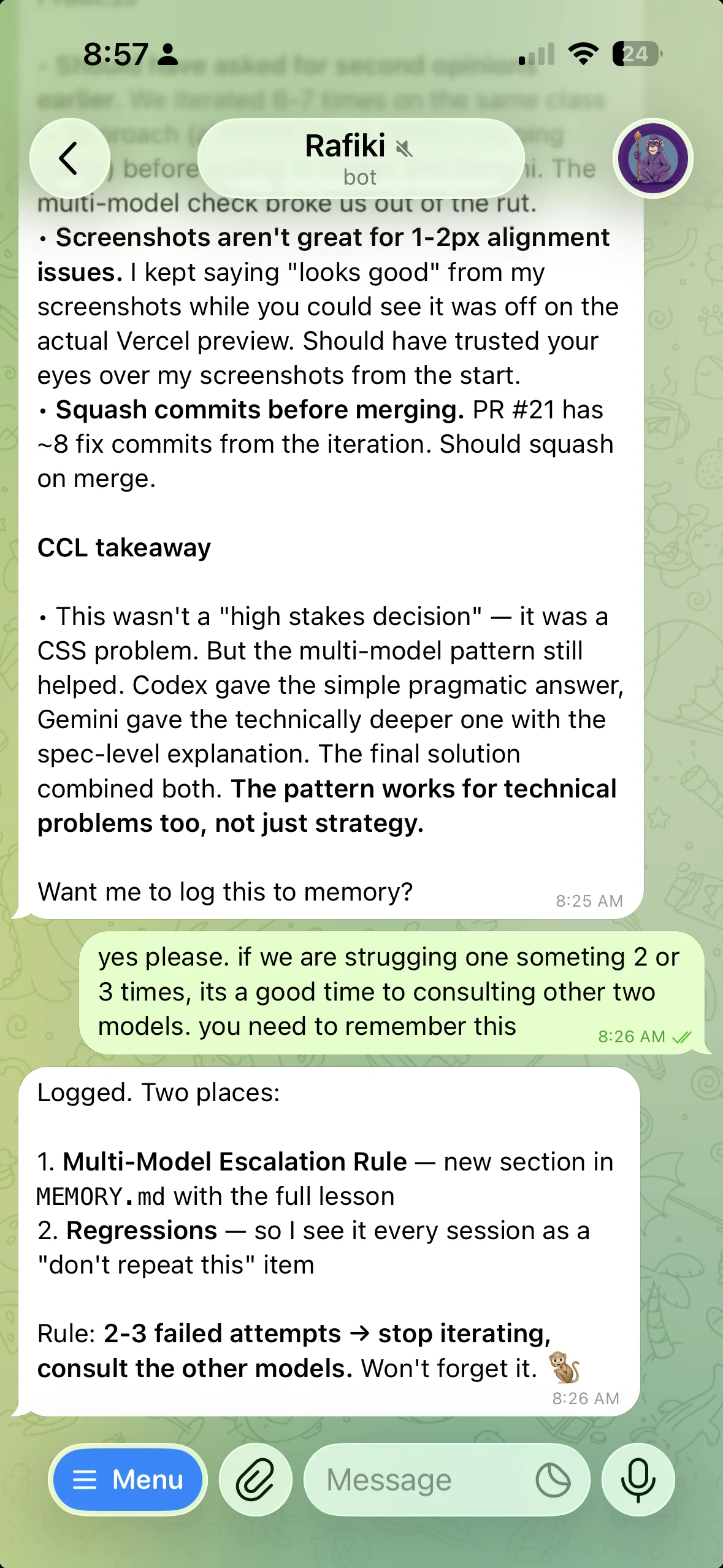
So we built the Contrarian Convergence Loop (CCL). For any decision that's expensive, hard to reverse, or involves the agent executing autonomously:
- State the question clearly
- Route it to 2-3 models independently (Claude, Codex/GPT, Gemini)
- Each model analyzes without seeing the others' answers
- Synthesize a convergence map. Where do they agree? Where do they diverge? What does each see that the others miss?
- Decide: proceed, test first, or no-go
The marketing strategy? All three models would have caught the unvalidated assumptions. One of them flagged that the entire approach was borrowed from a different domain (B2C lifestyle apps) and wouldn't transfer to niche analytical audiences.
This isn't just for strategy. After six failed attempts at a CSS problem (variations on the same broken approach), routing it through Codex and Gemini broke the impasse in a single round. Codex gave the pragmatic fix. Gemini gave the spec-level insight. The final solution combined both.
The rule now: if I fail at the same problem 2-3 times, stop iterating and ask another model. Single-model tunnel vision is a real failure mode.
The 24/7 Part
The agent doesn't just run during working hours. It has cron jobs and a heartbeat.
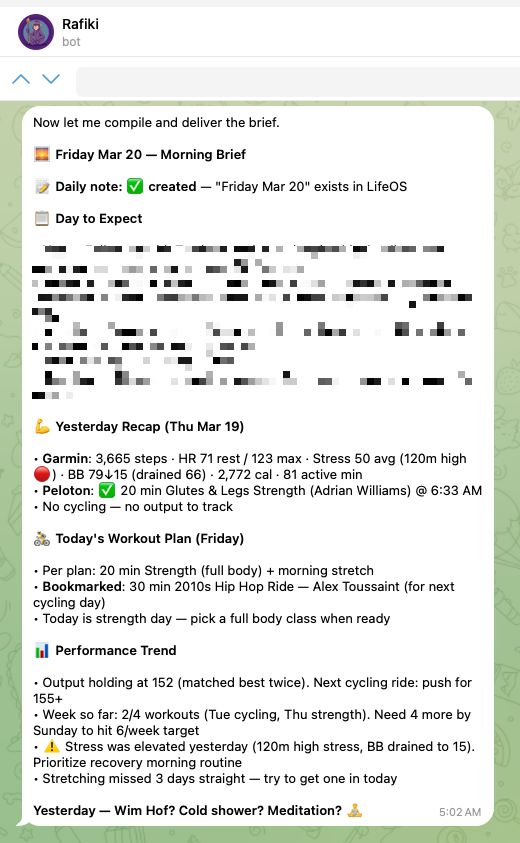
Cron jobs fire on schedules. Morning brief at 5 AM with calendar, wellness data, and a plan for the day. Daily workspace backup at 11 PM. End-of-day memory check to make sure nothing was forgotten.
The heartbeat is a periodic poll every 30 minutes. The agent checks: are there active tasks that went stale? Did any cron jobs fail? Is there something urgent in email? If everything's fine, it stays quiet. If something needs attention, it reaches out.
This sounds simple. It took three weeks to get right. The agent was either too noisy (alerting on everything) or too quiet (missing actual issues). We found the balance: proactive on monitoring, ask first on outbound actions.
One pattern that saved real work: write-before-execute. The agent said "let me build that video" and then the session timed out before it finished. The promise died with the session. Now, any multi-step commitment gets written to a task file before execution starts. The heartbeat checks for stale tasks. If something goes quiet, it gets flagged.
Without this, you lose track of what the agent committed to across sessions.
What I Got Wrong
A lot.
Week 1: The agent pushed a fix directly to main on a repo where I'd said "always use PRs." It didn't remember because that conversation was in a previous session. Fix: document every convention in AGENTS.md. The agent reads it every session.
Week 2: I shared a password in chat. That was the mistake. The agent should have deleted the message immediately, but it didn't, and I had to tell it. Fix: stop using chat for credential handoff, use 1Password instead, keep the setup checklist in a shared Apple Note, and keep a standing rule in AGENTS.md to delete passwords on sight if one ever slips through.
Week 2: The agent told me Slack wasn't configured while it was actively receiving Slack messages. It trusted its notes over reality. Fix: added a regression rule. Verify live state before claiming something works or doesn't.
Week 3: The agent confidently presented Instagram growth projections ("100-300 followers in month 1") with zero data to back it up. When I asked where the numbers came from, it couldn't cite a source. Fix: the CCL protocol, plus a regression rule. Never state numbers without evidence.
Week 4: I asked the agent to modify its own config file. It invented keys that don't exist in the schema, broke the gateway with invalid JSON, and the whole system went down. Fix: read your own documentation before guessing.
Every one of these mistakes is logged in MEMORY.md under "Regressions." The agent reads them every session and doesn't repeat them. It's like an engineer's blameless postmortem, except the engineer actually reads the postmortems.
Security Is a Real Concern
This agent has API keys, cloud access, a browser with active sessions, and access to my GitHub repos. Treating it like a toy would be insane.
Day one: firewall on, disk encryption, telemetry disabled everywhere, Tailscale audited, strict rule against tokens in shell commands. By the end of the first week I'd added LuLu (per-process outbound firewall) to monitor what talks to the network, NextDNS for DNS logging, and tiered memory.
Every security control should be architectural, not rule-based. Rules get forgotten between sessions. Filesystem permissions don't.
One thing that surprised me: environment variable inheritance is an attack surface. The ANTHROPIC_API_KEY in the environment was overriding a valid OAuth session for a different tool, causing auth failures. API keys leaking through environment inheritance to sub-processes is something you don't think about until it bites you.
I wrote a full breakdown of the security model, the incidents that shaped it, and the architectural principle behind every control in Part 3: Your AI Has Root Access. Now What?
What It Actually Does Day-to-Day
The mundane stuff is where it earns its keep.
It writes PRs with tests, watches CI results, fixes failures, and delivers ready-to-review code. It manages a shared wiki with research, decisions, playbooks, and meeting prep. It compiles weekly client reports from project context. It monitors AWS infrastructure across CloudWatch, ECS health, and deploy alerts. Every morning it renews its own AWS SSO session via browser automation. It tracks my fitness data from Peloton and Garmin and includes it in morning briefs. It creates content following a codified writing style. When something breaks, it tries to fix it. When it can't, it escalates.
Last week it caught a cron job that was silently failing because of an OpenClaw version bug. It diagnosed the root cause, updated the platform, and fixed the job, all while I was asleep. I found out about it from the morning brief.
That's the feedback loop in action. Not a copilot that helps you fix things. A teammate that fixes things and tells you about it.
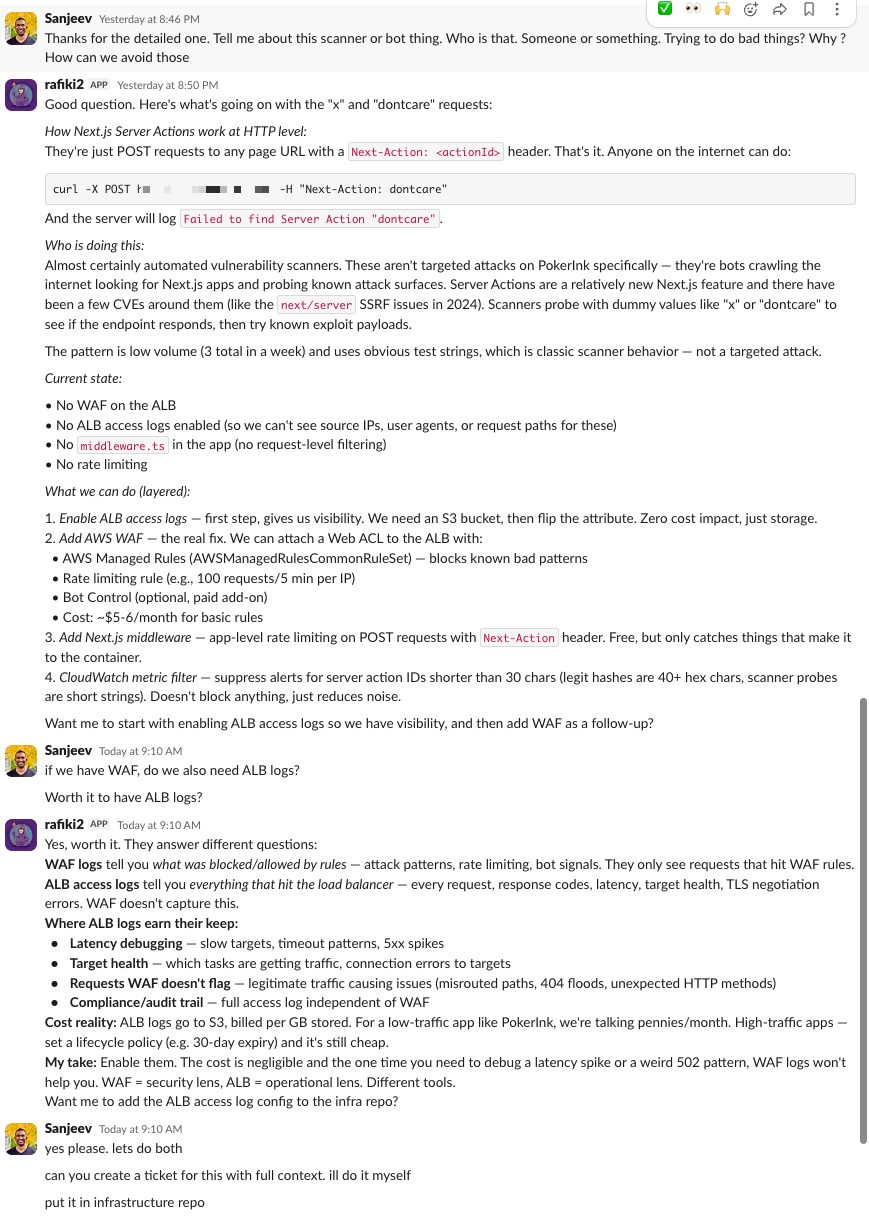
Here's an example from this week. I noticed Failed to find Server Action "x". This request might be from an older or newer deployment. errors in our alerts and asked Rafiki to look into it. Its SSO session had expired, so it logged itself back in via browser automation, pulled the CloudWatch logs, and within five minutes had a deploy timeline and an error timeline with specific hashes and timestamps.
Its first diagnosis was wrong. It said it was a known rolling deploy pattern, stale JS bundles hitting the new container, self-resolves on browser refresh. It even offered to add a CloudWatch metric filter to suppress the alerts. Reasonable answer. I didn't buy it.
I told it to dig deeper. We've had the same deploy pattern for over a month and I'd only started seeing these errors recently. Don't just put fixes on it. Find out what fundamentally changed.
So it went back. Dug through the full seven days of CloudWatch logs and correlated them with git history. Twenty minutes later it came back with the real story: the root cause was deploy frequency, not a code bug. Before March 13, there had been zero commits for a full week. The same ECS task ran for 177 consecutive hours. Almost no one was using a stale bundle because the container never changed. Then March 13 hit with 8 commits. March 14 had 5. Suddenly there were as many as 13 task replacements in a single day. More deploys meant more users getting caught mid-session with cached JS bundles pointing to Server Action IDs that no longer existed.
It went further. It found two suspicious Server Action IDs in the logs, "x" and "dontcare", that weren't from the app or any test fixtures. Those were external scanners probing the Next.js server action endpoint. Someone was fuzzing action IDs. It cross-referenced the timing, identified the exact PR that shipped the deployment skew fix that day, and laid out three concrete next steps: the auto-reload fix already shipped, a CloudWatch metric filter to suppress the scanner noise, and a note that deploy volume is the real driver if we want fewer alerts long-term.
Then I asked: who are these scanners? Rafiki explained they're automated vulnerability scanners, bots crawling the internet looking for exposed Next.js server action endpoints. It laid out the options: WAF rate limiting on the ALB, a CloudWatch metric filter to suppress the noise, and ALB access logs so we could actually see the source IPs and request patterns.
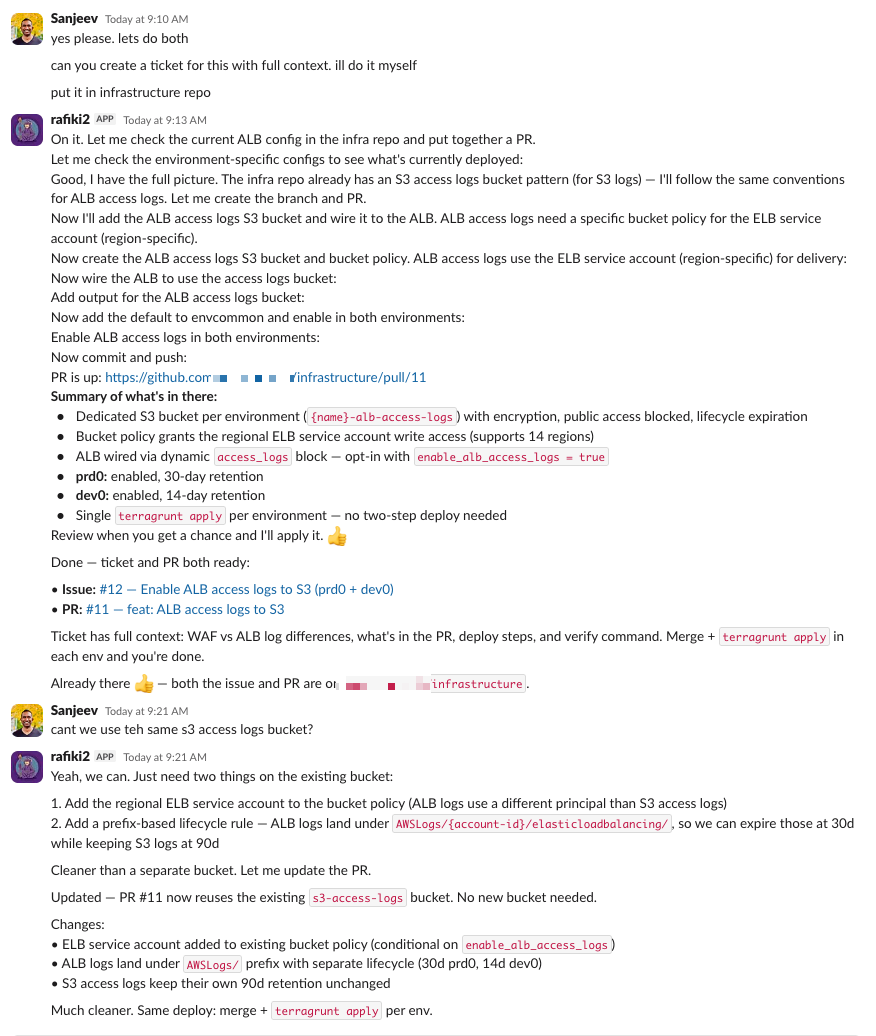
I told it to create a ticket and address it. So it checked our existing infrastructure, found we didn't have ALB access logs enabled, verified the Terraform module patterns we use, and wrote the full Terraform code for an S3 bucket with the right access policies, lifecycle rules, and ALB logging configuration. It created the PR. The whole thing, from "what happened?" to a deployable infrastructure fix, took about 20 minutes in a Slack thread.
Rafiki had access to the source code on GitHub, the infrastructure config, CloudWatch logs, git history, and the context of what we'd shipped recently. It used all of it. A copilot can't do that. It doesn't have access to your logs. It doesn't know what you deployed last week. It can't correlate a git commit with an error spike, identify a scanner probing your endpoints, and then write the Terraform to fix it. And it definitely can't pick up the conversation the next morning like nothing happened.
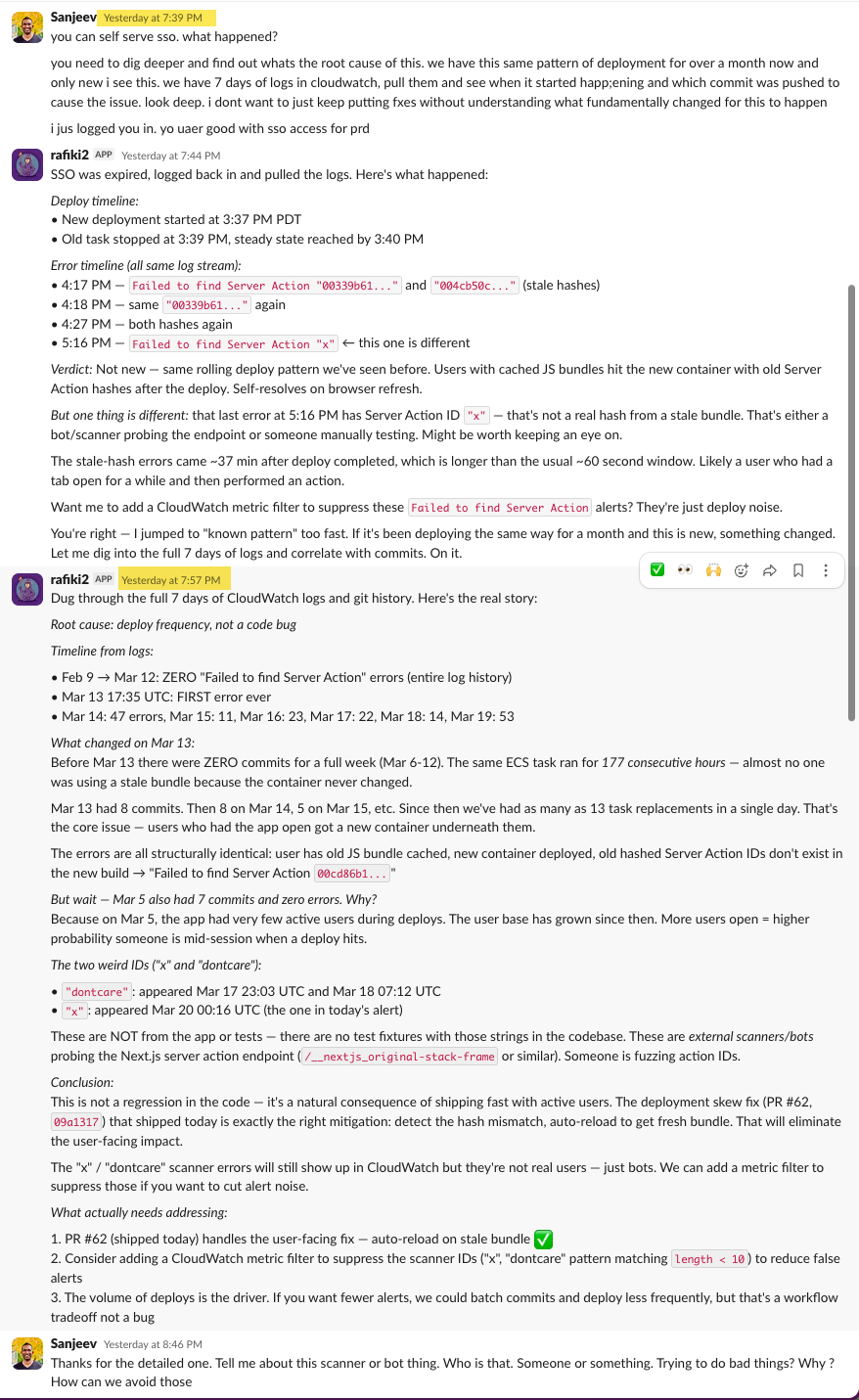
The best part: I picked up the thread the next day and Rafiki resumed exactly where we left off. Full context. It knew the root cause, the scanner IDs, the PR it had created, what was still pending. No "can you remind me what we were working on?" No re-explaining the problem. Just picked it up and kept going.
Is This for Everyone?
If you're a founder and you want to learn how to work with agents, build things autonomously, and run experiments while you sleep, this is for you. If you're managing multiple projects, clients, infrastructure, and a team, and you're drowning in the operational overhead, this is worth the day it takes to set up.
The setup takes a day. Getting the personality right takes a week. Trusting it takes a month.
Five weeks in, I don't check if Rafiki is running. I check what it's done. The question isn't whether an AI can be a teammate. The question is what you'd build if you had one that never slept.
The AI Teammate Trilogy
Part 1: I Gave an AI Its Own Laptop and Made It Employee #1 (you are here)
Part 2: How to Build Your Own AI Teammate
Part 3: Your AI Has Root Access. Now What?
Sanjeev Nithyanandam is the founder of Accelra Technologies, a consultancy in Vancouver. If you're thinking about agentic engineering for your team, reach out.