AI made generating code easy. That part is mostly solved.
Assembling that code and running it safely in the cloud did not get easier, and for a startup selling into healthcare or payments, safely is the whole game. You feel the gap the day your first real customer sends a security questionnaire. Hundreds of rows of it. Encryption at rest. Audit logging. Key rotation. Backup and recovery. Least privilege. "Describe your data residency controls." "Attach your most recent penetration test."
Long pause.
This is the companion to The Road, Not the Cars. That post argued that AI changed the code layer and left the infrastructure layer untouched. Security is the part of that infrastructure layer founders underestimate the most. Not because they don't care. Because AWS does not hand it to you, and the gap between "it works" and "it would survive an audit" is invisible until someone makes you prove it.
So let me make the invisible part concrete. This is how we build secure foundations on AWS for startups that need to be HIPAA, PCI, or SOC2 ready. The examples below come from a HIPAA platform we built for a healthcare startup. The principles are the same whatever the regime.
A Fresh AWS Account Is Not Secure. It Is Empty.
Empty is not the same as safe.
A new S3 bucket is not encrypted the way an auditor means it. A new account has nobody watching it. The default VPC is wide open. There is no record of who did what. Compliance, underneath the paperwork, is a small set of promises about how data is stored, watched, and recovered. AWS will happily let you break every one of them by default, and it will not warn you.
The instinct is to fix this at the end. Ship the product, then "do security" before the enterprise deal closes. That order is backwards, and it is expensive, for a reason most people learn the hard way: almost nothing in AWS security is retroactive. More on that below. The cheap path is to build the foundation correct from the first commit, so the account is defensible before there is any data in it to lose.
That foundation has two layers under the security work itself: automation first, then the four jobs security actually does. Prevent. Detect. Fix. Alert.
The Foundation Is Poured Once, In Code
You cannot secure what you built by clicking.
A console click cannot be reviewed. It cannot be reproduced. It cannot be diffed when it drifts, and it cannot be explained to an auditor eighteen months later when the person who clicked it is gone. "Infrastructure is artisanal" is a finding, not a workflow.
So everything is Terraform, organized with Terragrunt across multiple accounts. One account for the org foundation, separate accounts for logs, audit, non-prod, and production. Every component a stack deploys is visible in the configuration. Nothing is created silently inside a module. If a thing exists in the account, it exists in the code, in a pull request, with a name and a reviewer.
The most important rule we follow: hardened resources come from one shared module, never hand-rolled. A bucket is the clearest example. Every bucket in the org, whether it holds uploads, logs, Terraform state, or audit trails, comes from the same module, and the module bakes the baseline in.
module "buckets" {
  source   = "./modules/shared/s3-bucket"
  for_each = local.buckets        # one map entry per bucket, declared in the HCL

  name          = each.value.name
  versioning    = true            # recovery, and a prerequisite for object lock
  sse_algorithm = "aws:kms"       # customer-managed key, not the AWS default
  kms_key_arn   = each.value.kms_key_arn
  force_tls     = true            # deny any request where aws:SecureTransport is false
  # public access block (all four), BucketOwnerEnforced, and access logging
  # are not options in this module. They are always on.
}
Adding a bucket is adding a map entry. You cannot create one that forgot to block public access, because the module will not let you. That is the whole point. The secure thing is the default thing, and the insecure thing is not reachable.
Lean on external modules sparingly. When you do use one, pin it to an exact commit, not a floating tag. A tag can be moved. A registry can be compromised. The supply chain is the part of your infrastructure you did not write and cannot see, so you nail it to a hash you reviewed and let nothing change underneath you between one apply and the next. Pinning is the difference between a dependency you chose and a dependency that chose you.
And the deeper reason to write your own modules is not control for its own sake. It is that a module you own is a module you can make secure by default. You cannot quietly bake your encryption, your tagging, your public-access rules into someone else's module without forking it. When the baseline lives in your own code, hardening it is a one-line change in one place that every resource in the org inherits. That is why the bucket above looks the way it does, and why a year from now it will be even more locked down without a migration.
This is what people miss when they think automation is about speed. It is also about removing the option to do it wrong.
Security Has Four Jobs: Prevent, Detect, Fix, Alert
Once the foundation is poured, the security work is four jobs. Prevent the bad state from being reachable at all. Detect the problems and threats that slip past prevention. Fix what is wrong. Alert a human when something matters. Each job has AWS services built for it, and the trick is wiring them into one loop, not running them as four disconnected efforts nobody is accountable for.
The security loop
Fixes flow back into the code, so every account inherits them.
The loop closes back into code. A finding does not get fixed in the console. It gets fixed in the module, so the fix is permanent and every future account inherits it. That is the difference between security work that compounds and security work you redo every quarter.
The first job is the one that pays for all the others.
Prevent: Build It In, Don't Bolt It On
Before you watch for problems, you remove the ability to create them.
Prevention is the cheapest security you will ever buy, because a control that makes the bad state unreachable never fires an alert and never needs remediation. It works at three points: the defaults you bake into your own resources, the policies at your organization boundary, and a scanner in the pull request. Start with the defaults, because they protect you even before the other two exist.
Defaults that make a resource born secure. Sensitive data at rest gets a customer-managed KMS key, not the AWS-managed default, so you control rotation and the key policy is auditable. The cost is real but small, and you cut it with bucket keys. Public access is blocked at the account level, not just per bucket: the account-wide S3 block, the EBS snapshot block, and VPC block public access are all settings on the account, so a single mistake later cannot expose data the account never should have been able to expose.
There is a law that makes getting these right at create time non-negotiable: settings are not retroactive. Turning on encryption changes future writes only. It never re-encrypts what already exists. Flip a bucket's default to your KMS key and the objects already in it stay exactly as they were. Worse, two writers ignore the bucket default entirely. AWS Config writes its own snapshots with its own SSE-S3, and the Terraform state backend writes state with its own SSE. To actually encrypt Config data with your key, you set it on the delivery channel, not the bucket.
resource "aws_config_delivery_channel" "this" {
  s3_bucket_name = aws_s3_bucket.config.bucket
  s3_kms_key_arn = aws_kms_key.config.arn   # without this, Config ignores your bucket default
}
This is why the order matters. Get it right at create time and it is one line. Get it wrong and find out during the audit, and now you are doing a careful per-account rollout, re-encrypting existing objects with a server-side copy, and verifying every one. The cheap version and the expensive version produce the same diagram. Only one of them happens on a Friday afternoon.
Policies at the organization boundary. Defaults protect the resources you build correctly. Boundary policies stop the ones you did not. If you have a data-residency requirement, and a healthcare or fintech startup almost always does, an Organization-level Service Control Policy denies every action outside your chosen region. We mirror AWS Control Tower's curated list of global services that must be exempted, rather than hand-rolling it.
{
  "Effect": "Deny",
  "NotAction": [ "iam:*", "organizations:*", "cloudfront:*", "route53:*" ],
  "Resource": "*",
  "Condition": { "StringNotEquals": { "aws:RequestedRegion": "ca-west-1" } }
}
And the Service Control Policy is only one kind of org policy. AWS Organizations supports a whole family, and they are worth knowing before you hand-roll something. SCPs cap what IAM principals can do. Resource Control Policies set the outer limit on who can touch your resources, the data-perimeter complement to SCPs. Backup policies enforce backup plans across every account. Tag policies keep tagging consistent, which is what makes tag-scoped rules and cost allocation work later. And the newer declarative policies for EC2, S3, and Security Hub let you set a configuration centrally that stays enforced even as AWS ships new features and APIs. In a large organization this is the layer that stops someone from deploying the insecure thing in the first place, which is cheaper than detecting it after they did.
A scanner in the pull request. There is one more net, and it catches the problem before anything deploys at all. Static analysis tools for infrastructure as code, Checkov, Trivy, KICS, read your Terraform in the pull request and flag the insecure pattern, an unencrypted bucket, a wide-open security group, a missing log setting, while it is still a diff. Wire one into CI and fail the build on a violation. The easiest insecure resource to remediate is the one that never got created.
Two honest notes on these scanners. They check the code, not the deployed reality, so they complement AWS Config rather than replace it: one guards the pull request, the other watches the running account. And they are noisy out of the box, so you tune the ruleset to your baseline instead of drowning the team in findings they will learn to ignore. Used well, your own secure-by-default modules sail through clean, and the scanner earns its keep on the hand-written IaC and the gaps the modules do not cover.
Detect: AWS Already Wrote the Rubric
Here is the part that trips people up, and it is worth saying plainly: you do not write these checks. AWS did.
AWS Config ships prebuilt conformance packs for HIPAA, PCI DSS, NIST, and more. Security Hub ships prebuilt standards: the AWS Foundational Security Best Practices, the CIS benchmarks, PCI DSS. Each one is a large library of rules, and each rule is a small automated test of one control. Is this bucket encrypted. Is this database backed up. Is CloudTrail on. Does this role carry a wildcard. The grading rubric an auditor will use is already written, already maintained by AWS, and one click from being turned on.
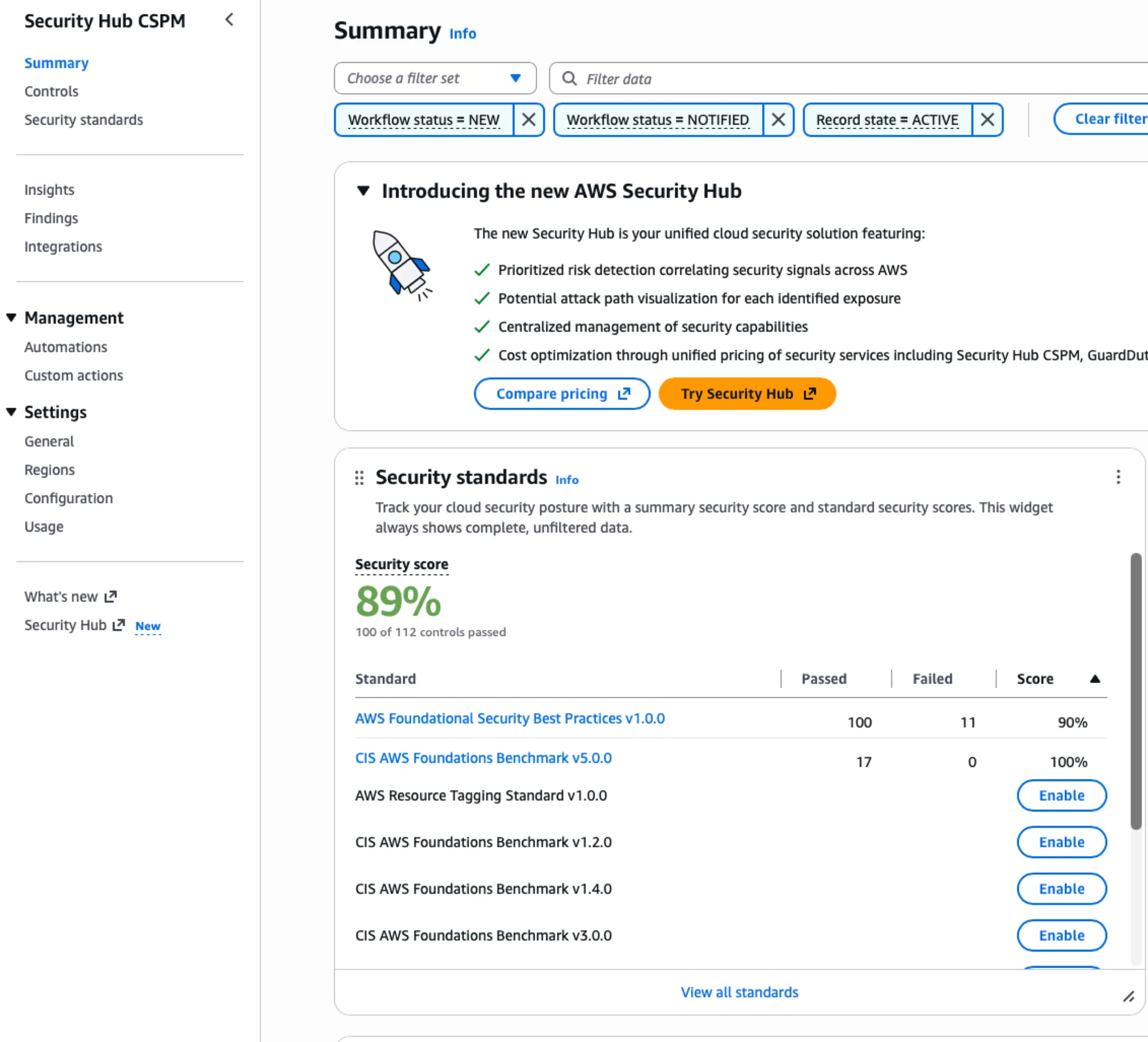
That sounds like it should make compliance easy. It does not, and the reason is the whole point of this post. Turning on the rubric is trivial. Passing it is the work, and you only pass it cleanly if the infrastructure was built correct in the first place. AWS will happily grade you. It will not do your homework.
So detection is mostly turning on what AWS already provides, then layering the threat detectors on top. No single service sees everything, so it comes in layers.
AWS Config records the configuration of every resource and continuously evaluates it against rules. This is the backbone of compliance evidence. You attach a conformance pack mapped to your framework, and Config tells you, resource by resource, what is compliant and what is not. For the HIPAA build we ran the HIPAA Security conformance pack across the org.
Security Hub sits above Config and aggregates findings against the standards, with a single score per standard. We run the Foundational Security Best Practices standard plus a current CIS benchmark. One thing worth knowing: AWS auto-enables a default set that still includes the old CIS 1.2.0 from 2018. We manage the enabled standards in code instead, so the set is deliberate and the deprecated benchmark is gone.
GuardDuty is the threat detector, not the config checker. It watches CloudTrail, DNS, VPC flow logs, and more, and flags the things that look like a compromise. Credentials used from an unusual location. A call to a known-malicious IP. An anomalous console login. Enable it org-wide so every account, existing and future, is covered.
CloudTrail is the record of who did what. It goes to two places: CloudWatch Logs, so you can search and alarm on it, and S3 with object lock for the long, tamper-proof retention an auditor wants. Many regimes want years. We had a ten-year bar for Canadian health records, so the durable copy lives in S3 under a write-once-read-many lock.
IAM Access Analyzer watches for resources that grant access outside your account or org. It is the thing that notices when a policy quietly became too generous.
Each of these is a layer. Config sees misconfiguration. GuardDuty sees behavior. CloudTrail sees history. Access Analyzer sees exposure. Together they are the account's senses.
Fix: Fix the Resource, Not the Rule
When a rule goes red, there are two ways to make it green. Change the resource, or change the rule. Almost always, change the resource.
It is tempting to silence a noisy control. The control is annoying, the deadline is close, and the rule has a parameter you could loosen. Resist it. The rule is the point. If a bucket is flagged as unencrypted, encrypt the bucket. Do not widen the rule until the bucket passes.
There are three honest exceptions, and they share a discipline.
Sometimes a rule does not apply to a given resource. The classic case: S3 server-access-log buckets cannot use your KMS key, because the log-delivery service cannot write with it. That one bucket stays on AES256. The right move is not to disable the "encrypt with KMS" rule globally. It is to scope the rule to a tag, so it enforces on every bucket that should be KMS-encrypted and ignores the one that genuinely cannot.
Sometimes a rule is not available in your region. Newer regions do not have every Config managed rule. You note the gap and cover it another way.
And sometimes the resource really must stay as it is. A public-facing load balancer has to accept traffic from the internet, and a rule that flags "security group open to the world" will flag it forever. That is a real risk acceptance, and it goes in a risk register: the resource, why it cannot be remediated, the compensating controls, and the trigger to revisit it.
The standard is not a perfect score. One hundred percent literal compliance is usually not reachable, between region gaps and genuine exceptions. The honest target is that every red item is a documented, compensated, deliberate decision, and the rule stays active so it still catches the next real problem. An auditor trusts a documented exception. An auditor does not trust a rule someone quietly turned off.
Alert: Detection Without a Pager Is a Silent Gap
This is the one that bites quietly.
You can enable GuardDuty, watch it light up green in the console, and feel covered. But a detector that nobody is listening to is not a control. It is a logbook. GuardDuty found the problem at 2 AM and wrote it down, and the first you heard of it was the customer email.
So every detective service routes into one alerting path. EventBridge matches the findings that matter, sends them to SNS, and SNS posts to the channel the on-call actually watches. For GuardDuty we alert on anything at high severity, not just the one or two finding types most setups happen to wire up.
resource "aws_cloudwatch_event_rule" "guardduty_high" {
  event_pattern = jsonencode({
    source      = ["aws.guardduty"]
    detail-type = ["GuardDuty Finding"]
    detail      = { severity = [{ numeric = [">=", 7] }] }   # high and above
  })
}
# target: SNS topic, which fans out to Slack and email
The bar is simple. If a control can detect something serious, a human has to find out without opening a dashboard. Detection you have to go looking for is detection you will find too late.
What the Audit Actually Checks
Strip the ceremony off an audit and here is what is left. The auditor takes the framework, HIPAA or PCI or SOC2, and goes control by control: is it met, and can you prove it. Your Config conformance pack and your Security Hub standards are that proof, already mapped to the framework, already scored. The audit is largely a review of which controls pass, which fail, and whether your exceptions are documented and compensated. You pass or fail on that, and that is how the certification is granted.
This is why the free rubric is a trap as much as a gift. Because turning it on is one click, it is easy to believe you are close. The score tells the truth. A fresh account with the HIPAA pack attached and nothing else done does not start in the nineties. It starts low and red, across dozens of resources, because the pack is grading reality and reality was never built for it. The four jobs are what move that number, and you can watch them do it.
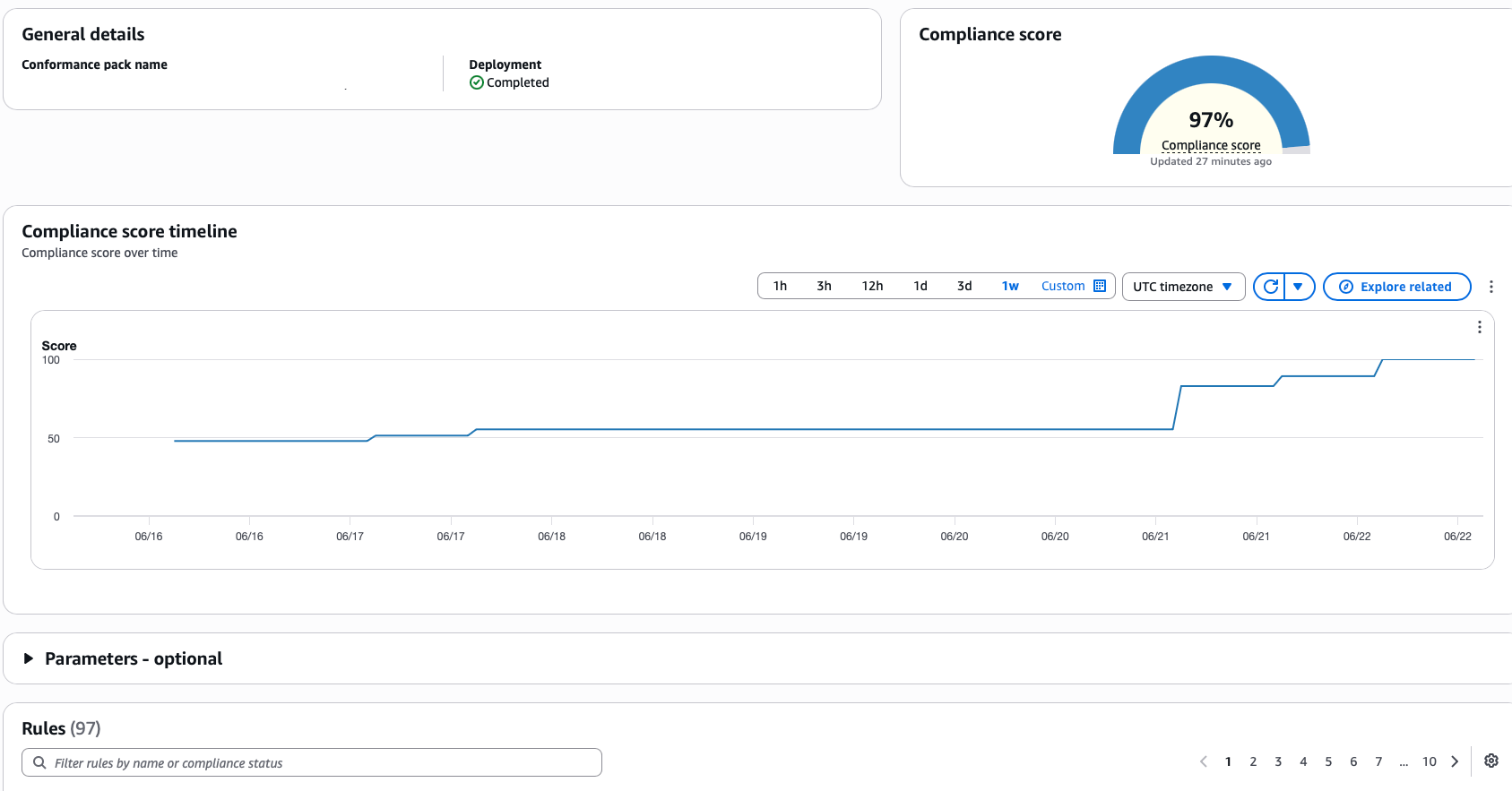
A foundation built correct from the start gets there without a frantic quarter of remediation before every audit.
The score is not a vanity metric. It is the thing that unblocks the deal.
What We Learned the Hard Way
The architecture above is the clean version. Here is what it cost to learn, on a real build.
Managed secret rotation can take your app down on a schedule. We used RDS-managed rotation for the database master password, which rotates it every few days, the secure default. The app read its database credentials through the ECS task definition, which resolves secrets once, at task launch, and never again. So every rotation left the running tasks holding a password that no longer worked, and the app failed to reconnect until the next deploy restarted it. A weekly outage, built from two features that are each correct on their own. The fix is to make the app fetch credentials at runtime and re-fetch on an auth failure, or put a connection proxy in front of the database. If you cannot do either yet, disable managed rotation on purpose, in code, so the trade-off is visible.
Verify the object, not the setting. When we moved buckets to customer-managed keys, the bucket settings said the right thing and the existing objects were still on the old encryption. The compliance rule that checks the bucket default went green while the data underneath had not moved. Check the object itself with head-object, never trust the bucket-level setting alone. A rule passing is not the same as the data being safe.
Cross-account encryption fails silently. Our member accounts deliver Config and CloudTrail data into one central bucket in a logging account, encrypted with a single customer-managed key. Two things break that quietly. The key has to be referenced by its full ARN, not an alias, because an alias only means something inside the account that owns it. And the key policy has to let the AWS service use the key from across the org. Miss either and delivery just stops. There is no error in your face, only a gap in the audit trail you find when you go looking for a log that was never written. After any change to an encryption key, force a delivery and confirm it landed.
Newer regions have holes, and they bite where you least expect. We ran in a newer AWS region to keep data in-country. The big services were all there. The catch was a Security Hub capability we wanted that the region did not support, and switching it on would have aggregated our findings into another region, which is exactly the residency line we were there not to cross. So we managed that piece per account instead. Residency and feature coverage pull against each other in the newest regions, and you design for the gap up front instead of discovering it mid-build.
None of these are exotic. They are the ordinary sharp edges of doing it for real, and they are exactly the things a "best practices" slide deck leaves out.
The Question
Most founders ask "are we compliant?" as if it is a checkbox with a date on it.
The better question is "would we survive both the audit and the breach?" Those are different tests. The audit asks whether you can prove the promises. The breach asks whether the promises were real. A foundation built right passes both, because the controls are not paperwork bolted on at the end. They are the shape of the account from the first commit.
You do not get there by trying harder before the deadline. You get there by making the secure thing the default thing, in code, so the insecure thing was never reachable. Pour the foundation once. Build the loop. Then go ship the product, which is the part you actually wanted to spend your time on.
The cars are cheap. So are the buckets. Build the foundation.
Sanjeev Nithyanandam is the founder of Accelra Technologies, an agentic engineering consultancy in Vancouver specializing in AWS, Terraform, and secure infrastructure for startups. If you are building toward HIPAA, PCI, or SOC2 on AWS and want the foundation done right the first time, get in touch.